OpenAudioTools Networking¶
How OpenAudioTools devices find each other, share audio, and exchange MIDI over a standard Ethernet network.
Design goals¶
- One cable carries audio, MIDI, and control between devices.
- Zero configuration — devices appear automatically, no static IPs or manual routing.
- Open standards only — no proprietary protocols, no licence fees.
- Cheap infrastructure — works with any consumer Ethernet switch or a single direct cable.
Physical layer¶
Every audio-capable device (MixTee, SynTee, HubTee) runs a Teensy 4.1 with its built-in DP83825I Ethernet PHY — 100 Mbps full-duplex over a standard RJ45 connection. The QNEthernet library provides the TCP/IP stack.
Control-only devices (e.g. a motorized-fader controller) can use a cheaper Teensy with an external SPI Ethernet module (W5500 or ENC28J60). They share the same UDP/IP stack but carry no audio and skip PTP.
The network is IPv4-only, single LAN, no routing. UDP handles all real-time traffic (audio, MIDI, discovery). TCP is reserved for optional configuration UIs.
Addressing and naming¶
Devices use DHCP when a server is available and fall back to IPv4 link-local (169.254.x.x, RFC 3927) when it is not. Either way, every device registers a human-readable hostname via mDNS:
model-XXXX.local
where XXXX is derived from the last four hex digits of the MAC address. Examples:
mixtee-01b7.localsyntee-a3f2.localhubtee-c4e1.localctrl-92cc.local
No manual IP assignment is ever needed.
User-settable device name¶
Each device has an optional device name that the user can set via the web UI or display (e.g. "Bass Synth", "Drums", "Main Mixer"). The name defaults to the model + MAC suffix (e.g. "SynTEE a3f2") and appears in:
- SAP/SDP — prefixed to the stream name in the
s=line (e.g.s=Bass Synth — Out 1-2) - DNS-SD — as the
UMPEndpointNameTXT field on_midi2._udpservices. The DNS-SD Service Instance Name (e.g.Bass Synth._midi2._udp.local) may also be human-readable, but per the Network MIDI 2.0 spec (§4.2) it is an internal identifier —UMPEndpointNameis the canonical display name - mDNS hostname — unchanged (
syntee-a3f2.local); the hostname stays stable for scripting and bookmarks
This lets users distinguish multiple devices of the same type at a glance in the patchbay, DAW, or any AES67 browser.
Discovery — SAP/SDP and DNS-SD¶
Discovery is split by media type: audio uses standard SAP/SDP (the same mechanism used by AES67), while MIDI uses DNS-SD with the standard Network MIDI 2.0 service type.
Audio discovery — SAP/SDP¶
Each audio-capable device periodically announces its RTP streams via the Session Announcement Protocol (SAP, RFC 2974). Announcements are multicast to 239.255.255.255:9875 and contain an SDP (RFC 4566) session description.
A typical SDP blob for a SynTEE stereo output (device named "Bass Synth"):
v=0
o=syntee-a3f2 1 1 IN IP4 169.254.23.183
s=Bass Synth — Out 1-2
c=IN IP4 169.254.23.183
t=0 0
m=audio 50000 RTP/AVP 97
a=rtpmap:97 L24/48000/2
a=ptime:1
a=ts-refclk:ptp=IEEE1588-2008
a=mediaclk:direct=0
Key SDP fields and their meaning:
| SDP line | Meaning |
|---|---|
o= |
Originator — device hostname and session version |
s= |
Session name — device name + stream name |
c= |
Connection — sender IP address |
m=audio |
Media line — port, RTP profile, payload type |
a=rtpmap |
Codec — L24 (24-bit PCM), sample rate, channel count |
a=ptime |
Packet time in ms |
a=ts-refclk |
Clock reference — PTP IEEE 1588-2008 |
a=mediaclk |
Media clock offset |
This is the standard AES67 SDP format. Any AES67-compatible receiver (Dante, Ravenna, software drivers) can discover and subscribe to OAT audio streams, and vice versa.
SAP announcements repeat every ~30 seconds per stream. A receiver that stops hearing announcements for a stream considers it offline.
MIDI discovery — DNS-SD¶
MIDI endpoints are advertised via DNS-SD with the standard Network MIDI 2.0 service type:
_midi2._udp.local
This is the service type defined by the MMA's Network MIDI 2.0 specification (M2-124-UM). Any Network MIDI 2.0 device on the same LAN can discover OAT MIDI endpoints, and OAT devices can discover third-party endpoints.
MIDI service TXT fields¶
The Network MIDI 2.0 spec (M2-124-UM §4.4, Table 6) defines exactly two TXT record keys:
| Key | Format | Meaning |
|---|---|---|
UMPEndpointName |
UTF-8, up to 98 bytes | User-visible display name (e.g. "Bass Synth") |
ProductInstanceId |
ASCII 32-126, up to 42 bytes | Statistically unique device identifier |
OAT-specific metadata (direction, model, channel count) is not advertised in DNS-SD TXT records. Devices discover these details via UMP MIDI-CI Property Exchange after a session is established.
Example discovery names¶
Bass Synth — Out 1-2        ← SAP/SDP session name (s= line)
Main Mixer — Main           ← SAP/SDP session name (s= line)
Fader Bank._midi2._udp.local        ← DNS-SD MIDI service
Devices can also browse for peer services to auto-pair — a fader controller discovers the MixTEE's MIDI endpoint and connects without user intervention.
Clock synchronisation — PTP¶
Audio devices synchronise their sample clocks with PTP (IEEE 1588v2). Grandmaster election follows the standard Best Master Clock Algorithm (BMCA), so OpenAudioTools devices negotiate cleanly with any PTP-capable device on the same LAN.
Each device type advertises a priority1 value that expresses its suitability as clock source:
| Priority | Device | Rationale |
|---|---|---|
| 128 | MixTEE | Receives and mixes multiple streams — natural clock anchor |
| 144 | HubTEE | Bridges audio and MIDI — good fallback |
| 160 | SynTEE | Single-output source — least preferred |
If priorities are equal (e.g. two SynTEEs, or an OAT device and a third-party device at the same priority), BMCA breaks the tie using clock quality and MAC address as defined by IEEE 1588.
- All other audio devices lock to the elected grandmaster as PTP slaves.
- RTP timestamps are derived from the shared PTP clock, keeping all streams sample-aligned.
Interoperability¶
- AES67 / Dante / Ravenna devices — Because OAT devices use standard BMCA, a third-party AES67 device on the same LAN participates in the same grandmaster election. If it wins (e.g. a dedicated PTP grandmaster clock at
priority1=1), OAT devices will lock to it. This is by design — one shared clock domain means zero sample-rate conversion between OAT and AES67 streams. - Computers / DAWs — A USB-connected computer does not participate in PTP; the OAT device it is plugged into bridges the clock domain. A computer connected over Ethernet with an AES67 software driver (e.g. Dante Virtual Soundcard, RAVENNA ASIO) is a regular PTP participant and joins the same BMCA election.
The current implementation is software-based, using the Teensy's GPT timer at 1 MHz. This gives ~10-100 us accuracy — well within the 1 ms packet buffer and sufficient for studio use. Nanosecond-grade accuracy (full AES67 compliance) would require a PHY with hardware PTP support such as the DP83640; the DP83825I on the Teensy 4.1 does not have this.
Control-only devices do not participate in PTP.
Audio transport — RTP¶
Audio travels as uncompressed RTP over UDP, following a fixed AES67-style profile:
| Parameter | Value |
|---|---|
| Sample rate | 48 kHz |
| Bit depth | 24-bit PCM |
| Packet time | 1 ms (48 samples per channel) |
| Channel counts | Fixed per stream: 2, 8, or 16 |
UDP ports are either statically assigned per device (e.g. 50000 + stream index) or advertised in DNS-SD records.
A receiver subscribes to a stream using the sender's IP, port, and stream ID. On a small studio LAN (fewer than 10 devices) unicast is preferred — it is simpler and avoids IGMP snooping issues on consumer switches. Multicast becomes worthwhile only when multiple receivers need the same stream.
Bandwidth¶
16 channels of 48 kHz / 24-bit audio = 18.4 Mbps uncompressed. The 100 Mbps Ethernet link has ample room for audio, MIDI, mDNS, and PTP simultaneously.
MIDI transport — MIDI 2.0 over UDP¶
MIDI uses MIDI 2.0 Universal MIDI Packets (UMP) carried over UDP, following the MMA's Network MIDI 2.0 specification (M2-124-UM v1.0.1).
Host/Client model¶
The spec (§2.1-2.2) defines two roles:
- Host — exposes a UMP Endpoint on a dedicated UDP port and handles incoming session requests.
- Client — initiates sessions with Hosts.
A device can act as both Host and Client simultaneously (spec §9). OAT devices that expose MIDI endpoints (SynTEE, MixTEE, HubTEE) act as Hosts; when they connect to other devices' endpoints they act as Clients.
Packet format¶
All Network MIDI 2.0 UDP packets begin with the signature 0x4D494449 ("MIDI" in ASCII) followed by a command-specific header. Data packets include 16-bit sequence numbers for loss detection and optional FEC (spec §7.2.2) for recovery.
Session lifecycle¶
- Invitation — Client sends an Invitation command to the Host's UDP port.
- Accepted — Host replies with an Invitation Accepted command (or rejects).
- UMP Data — Both sides exchange UMP packets over the established session.
- Bye — Either side sends a Bye command to end the session cleanly.
The spec defines six session states (Pending, Authentication, Accepted, Rejected, Closing, and Session Reset) and a Ping/Pong keepalive mechanism. OAT v1 uses the basic Invitation → Accepted → Data → Bye flow.
This runs alongside audio on the same Ethernet cable. CPU cost is under 1%.
Device roles¶
Each device type has a defined network personality:
SynTEE (SynTee)¶
- Publishes 1–N audio TX streams (main and aux outputs).
- Publishes one MIDI endpoint (Host, bidirectional).
- Optionally browses for controllers to auto-pair.
MixTEE (MixTee)¶
- Default PTP grandmaster (
priority1=128). - Publishes multiple audio streams — both RX (inputs) and TX (buses, mains, auxes).
- Publishes a MIDI endpoint for full mixer control.
- Optionally serves a small web UI at
http://mixtee-XXXX.local/.
HubTEE (HubTee)¶
- Subscribes to audio streams from SynTEEs and MixTEEs.
- Publishes its own audio streams if needed.
- Bridges Network MIDI 2.0 to and from DIN/USB MIDI.
- Can run the Patchbay (see below).
Controller (e.g. motorized-fader surface)¶
- No audio, no PTP.
- Publishes one MIDI endpoint (Host, bidirectional).
- Browses for the MixTEE's MIDI endpoint and pairs automatically.
Patchbay¶
The patchbay is a lightweight routing manager that runs on the MixTEE or HubTEE:
- Periodically browses SAP announcements for audio streams and
_midi2._udpfor MIDI services. - Builds an in-memory graph of every device, port, and stream from the SDP and DNS-SD data.
- Exposes a simple web UI (HTTP/JSON + minimal HTML/JS) or an OSC/JSON API.
- Applies routes by opening/closing RTP sockets for audio and initiating MIDI 2.0 sessions between endpoints.
This gives the user a single place to see every device on the network and patch audio and MIDI connections between them.
Security¶
Version 1 assumes a trusted, isolated studio LAN:
- No encryption. The Network MIDI 2.0 spec (§6.7-6.10) defines optional session authentication (SHA-256 digest challenge-response) that could be adopted in a future version if needed.
- All custom UDP ports live in a documented, non-conflicting range (
50000–50100). - Audio uses standard SAP/SDP; MIDI uses the standard
_midi2._udpservice type.
Resource budget (Teensy 4.1)¶
All network services fit comfortably alongside the existing audio DSP workload:
| Task | CPU |
|---|---|
| Audio DSP (TDM + mixer) | ~30% |
| RTP encode/decode | 1–3% |
| PTP timestamping | 2–5% |
| SAP/SDP announcements | < 0.5% |
| mDNS / DNS-SD | < 0.5% |
| MIDI 2.0 over UDP | < 1% |
| QNEthernet stack | 2–3% |
| Total | ~40–41% |
~60% CPU headroom remains. Memory is similarly comfortable: 8 MB PSRAM total, ~2 MB used for recording buffers, leaving 6 MB for RTP ring buffers, PTP logs, and mDNS cache.
Topology examples¶
Direct connection — A MixTee and a computer connected by a single Ethernet cable. Audio and MIDI flow over that one cable; link-local addressing and mDNS handle everything.
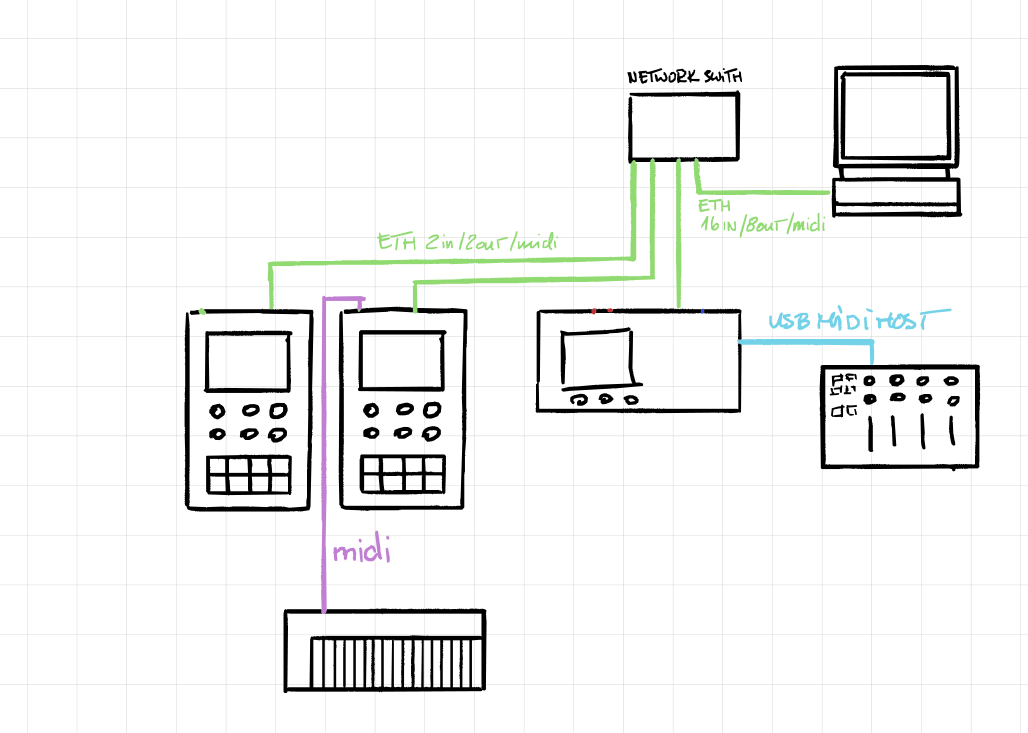
Star via switch — Multiple SynTees, a MixTee, and a computer all plugged into a cheap Ethernet switch. Every device discovers every other device automatically. The MixTee wins PTP grandmaster election by priority.
Star via HubTee — The HubTee acts as the central hub, connecting SynTees, computers, and MIDI controllers. It bridges USB/DIN MIDI onto the network and can run the patchbay UI for the whole setup.
Connectivity diagrams¶
HubTee as central hub — Multiple devices (SynTees, computers) connected through the HubTee via Ethernet and MIDI.
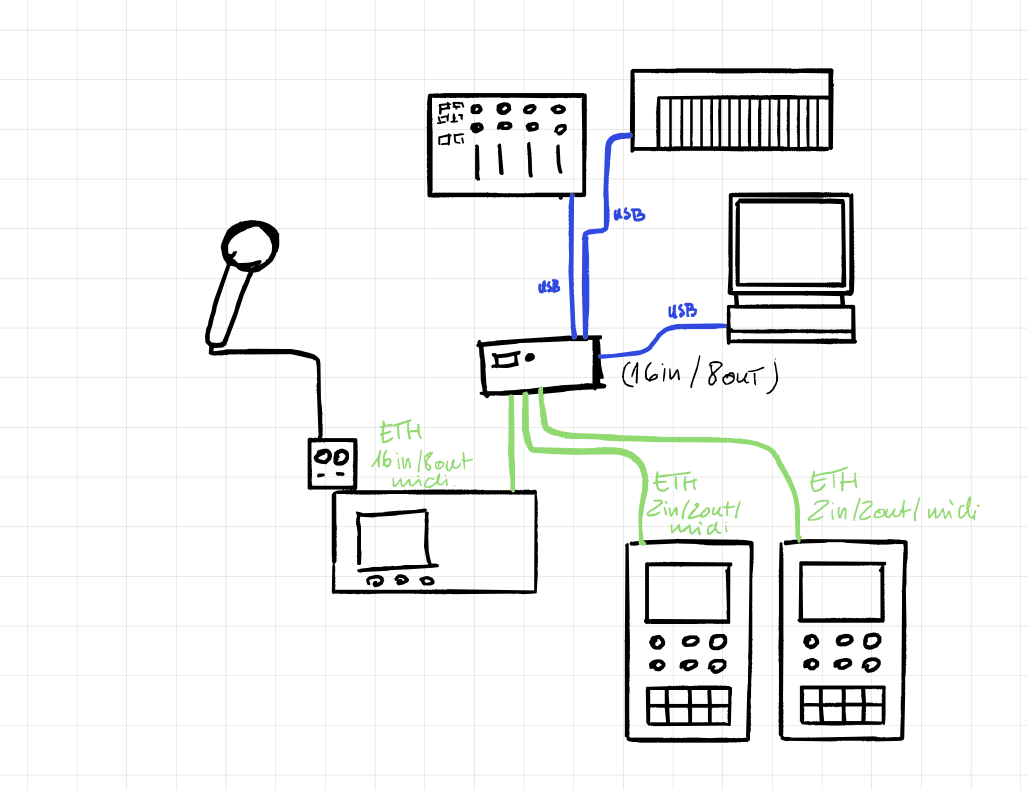
MixTee with USB — Audio routed via USB in/out to a computer, MIDI connections to controllers and synths.
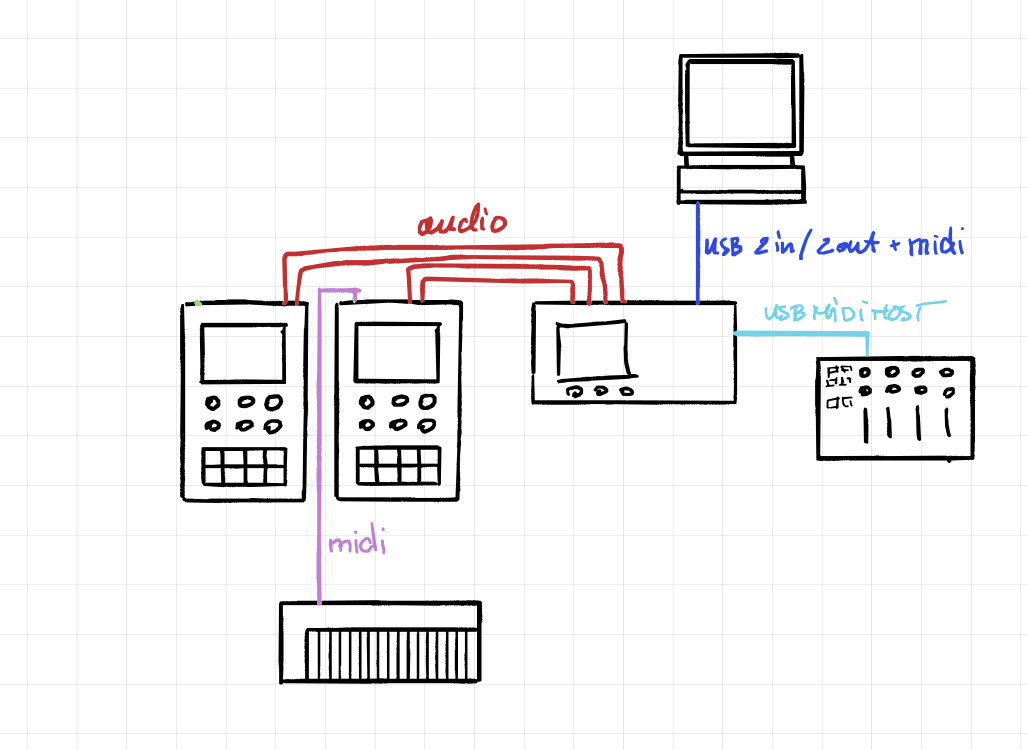
MixTee with Ethernet (direct) — Audio transported over Ethernet to a computer, with separate MIDI connections to devices.
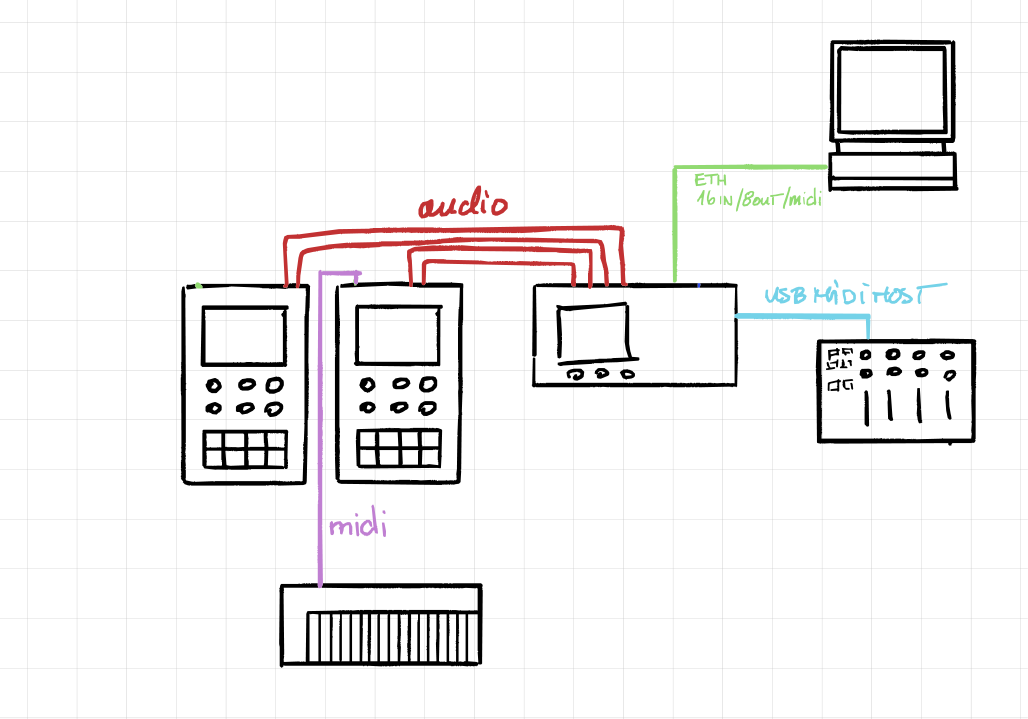
MixTee with Ethernet (switch) — Audio and MIDI both carried over Ethernet using a network switch, single-cable setup between all devices.