OpenAudioTools Networking
How OpenAudioTools devices find each other, share audio, and exchange MIDI over a standard Ethernet network.
Design goals
- One cable carries audio, MIDI, and control between devices.
- Zero configuration — devices appear automatically, no static IPs or manual routing.
- Open standards only — no proprietary protocols, no licence fees.
- Cheap infrastructure — works with any consumer Ethernet switch or a single direct cable.
Physical layer
Every audio-capable device (MixTee, SynTee, HubTee) runs a Teensy 4.1 with its built-in DP83825I Ethernet PHY — 100 Mbps full-duplex over a standard RJ45 connection. The QNEthernet library provides the TCP/IP stack.
Control-only devices (e.g. a motorized-fader controller) can use a cheaper Teensy with an external SPI Ethernet module (W5500 or ENC28J60). They share the same UDP/IP stack but carry no audio and skip PTP.
The network is IPv4-only, single LAN, no routing. UDP handles all real-time traffic (audio, MIDI, discovery). TCP is reserved for optional configuration UIs.
Addressing and naming
Devices use DHCP when a server is available and fall back to IPv4 link-local (169.254.x.x, RFC 3927) when it is not. Either way, every device registers a human-readable hostname via mDNS:
device-type-XXXX.local
where XXXX is derived from the last four hex digits of the MAC address. Examples:
mixer-01b7.localsynth-a3f2.localhub-c4e1.localctrl-92cc.local
No manual IP assignment is ever needed.
Discovery — mDNS and DNS-SD
At boot each device registers its services with DNS-SD so that every other device on the LAN can find it automatically.
Service types
| Service | Purpose |
|---|---|
_jfa-audio._udp.local |
Audio endpoint (RTP stream) |
_jfa-midi2._udp.local |
MIDI 2.0 endpoint (UMP over UDP) |
The _jfa- prefix is project-specific to avoid collisions with other mDNS services.
Audio service TXT fields
| Key | Values | Meaning |
|---|---|---|
role |
synth, mixer, hub |
What kind of device |
dir |
tx, rx, txrx |
Stream direction |
ch |
2, 8, 16 |
Channel count |
sr |
48000 |
Sample rate |
fmt |
pcm24 |
Sample format |
pkt |
1 |
Packet time in ms |
stream |
main, aux1, busA, ... |
Stream identifier |
MIDI service TXT fields
| Key | Values | Meaning |
|---|---|---|
dir |
in, out, inout |
Endpoint direction |
ump |
2.0 |
UMP version |
ep |
synth, mixer, ctrl, hub |
Endpoint role |
ch |
number | Logical channel count or groups |
Example service names
Synth Out 1-2._jfa-audio._udp.local
Mixer Main._jfa-audio._udp.local
Main Controller._jfa-midi2._udp.local
Devices can also browse for peer services to auto-pair — a fader controller discovers the mixer's MIDI endpoint and connects without user intervention.
Clock synchronisation — PTP
Audio devices synchronise their sample clocks with PTP (IEEE 1588v2):
- One device — by default the mixer — is the PTP grandmaster.
- All other audio devices lock to it as PTP slaves.
- RTP timestamps are derived from the shared PTP clock, keeping all streams sample-aligned.
The current implementation is software-based, using the Teensy's GPT timer at 1 MHz. This gives ~10-100 us accuracy — well within the 1 ms packet buffer and sufficient for studio use. Nanosecond-grade accuracy (full AES67 compliance) would require a PHY with hardware PTP support such as the DP83640; the DP83825I on the Teensy 4.1 does not have this.
Control-only devices do not participate in PTP.
Audio transport — RTP
Audio travels as uncompressed RTP over UDP, following a fixed AES67-style profile:
| Parameter | Value |
|---|---|
| Sample rate | 48 kHz |
| Bit depth | 24-bit PCM |
| Packet time | 1 ms (48 samples per channel) |
| Channel counts | Fixed per stream: 2, 8, or 16 |
UDP ports are either statically assigned per device (e.g. 50000 + stream index) or advertised in DNS-SD records.
A receiver subscribes to a stream using the sender's IP, port, and stream ID. On a small studio LAN (fewer than 10 devices) unicast is preferred — it is simpler and avoids IGMP snooping issues on consumer switches. Multicast becomes worthwhile only when multiple receivers need the same stream.
Bandwidth
16 channels of 48 kHz / 24-bit audio = 18.4 Mbps uncompressed. The 100 Mbps Ethernet link has ample room for audio, MIDI, mDNS, and PTP simultaneously.
MIDI transport — MIDI 2.0 over UDP
MIDI uses MIDI 2.0 Universal MIDI Packets (UMP) carried over UDP:
- Each MIDI endpoint gets one UDP port.
- The port and endpoint name are advertised via
_jfa-midi2._udp. - Session setup is simple: once two endpoints discover each other they handshake and begin exchanging UMP packets.
This runs alongside audio on the same Ethernet cable. CPU cost is under 1%.
Device roles
Each device type has a defined network personality:
Synth (SynTee)
- Publishes 1–N audio TX streams (main and aux outputs).
- Publishes one MIDI endpoint (
dir=inout,ep=synth). - Optionally browses for controllers to auto-pair.
Mixer (MixTee)
- Acts as PTP grandmaster.
- Publishes multiple audio streams — both RX (inputs) and TX (buses, mains, auxes).
- Publishes a MIDI endpoint for full mixer control.
- Optionally serves a small web UI at
http://mixer-XXXX.local/.
Hub (HubTee)
- Subscribes to audio streams from synths and mixers.
- Publishes its own audio streams if needed.
- Bridges Network MIDI 2.0 to and from DIN/USB MIDI.
- Can run the Patchbay (see below).
Controller (e.g. motorized-fader surface)
- No audio, no PTP.
- Publishes one MIDI endpoint (
ep=ctrl,dir=inout). - Browses for the mixer's MIDI endpoint and pairs automatically.
Patchbay
The patchbay is a lightweight routing manager that runs on the mixer or hub:
- Periodically browses
_jfa-audio._udpand_jfa-midi2._udpservices. - Builds an in-memory graph of every device, port, and stream from the DNS-SD TXT data.
- Exposes a simple web UI (HTTP/JSON + minimal HTML/JS) or an OSC/JSON API.
- Applies routes by opening/closing RTP sockets for audio and initiating MIDI 2.0 sessions between endpoints.
This gives the user a single place to see every device on the network and patch audio and MIDI connections between them.
Security
Version 1 assumes a trusted, isolated studio LAN:
- No authentication or encryption.
- All custom UDP ports live in a documented, non-conflicting range (
50000–50100). - All custom service types use the
_jfa-prefix to avoid namespace collisions.
Resource budget (Teensy 4.1)
All network services fit comfortably alongside the existing audio DSP workload:
| Task | CPU |
|---|---|
| Audio DSP (TDM + mixer) | ~30% |
| RTP encode/decode | 1–3% |
| PTP timestamping | 2–5% |
| mDNS / DNS-SD | < 0.5% |
| MIDI 2.0 over UDP | < 1% |
| QNEthernet stack | 2–3% |
| Total | ~40% |
~60% CPU headroom remains. Memory is similarly comfortable: 8 MB PSRAM total, ~2 MB used for recording buffers, leaving 6 MB for RTP ring buffers, PTP logs, and mDNS cache.
Topology examples
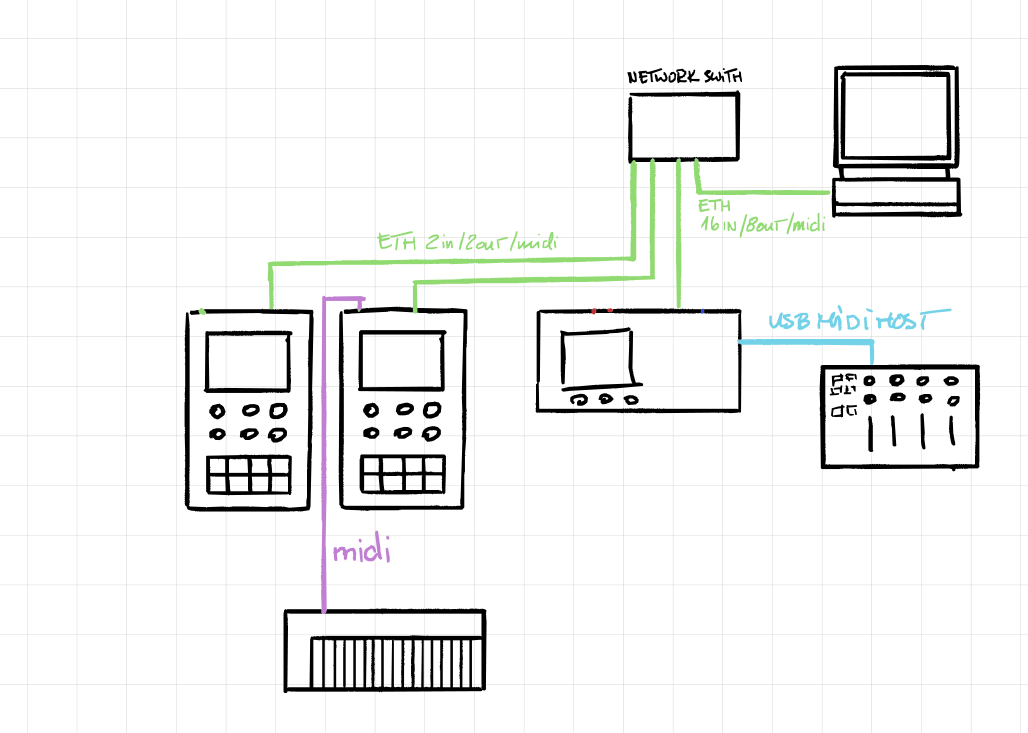
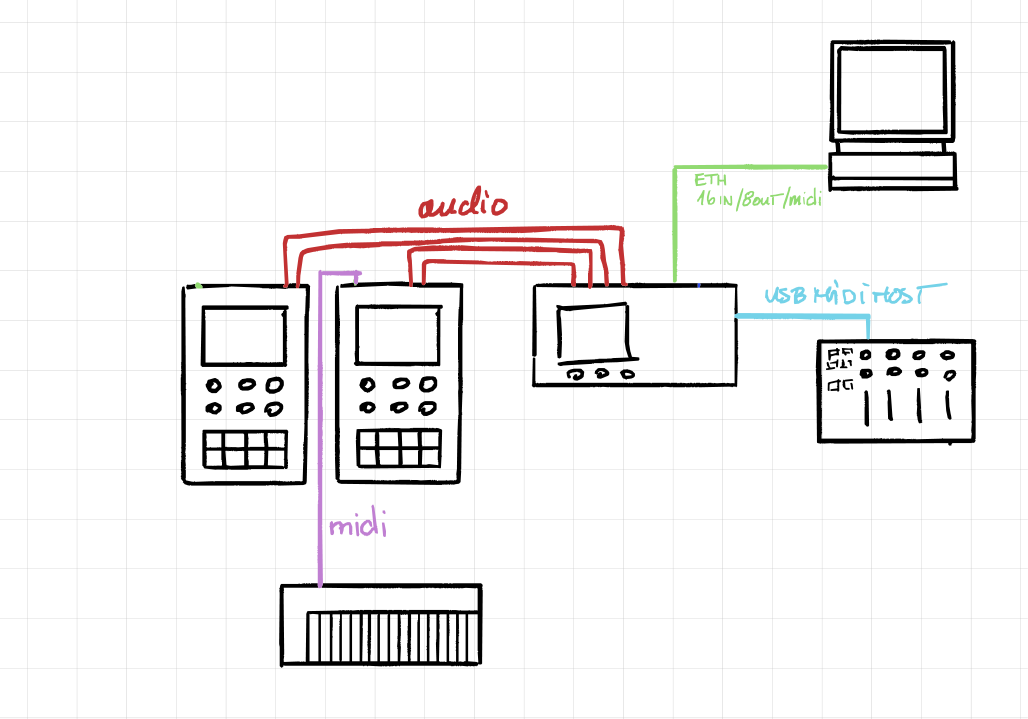
Direct connection — A MixTee and a computer connected by a single Ethernet cable. Audio and MIDI flow over that one cable; link-local addressing and mDNS handle everything.
Star via switch — Multiple SynTees, a MixTee, and a computer all plugged into a cheap Ethernet switch. Every device discovers every other device automatically. The MixTee is PTP grandmaster.
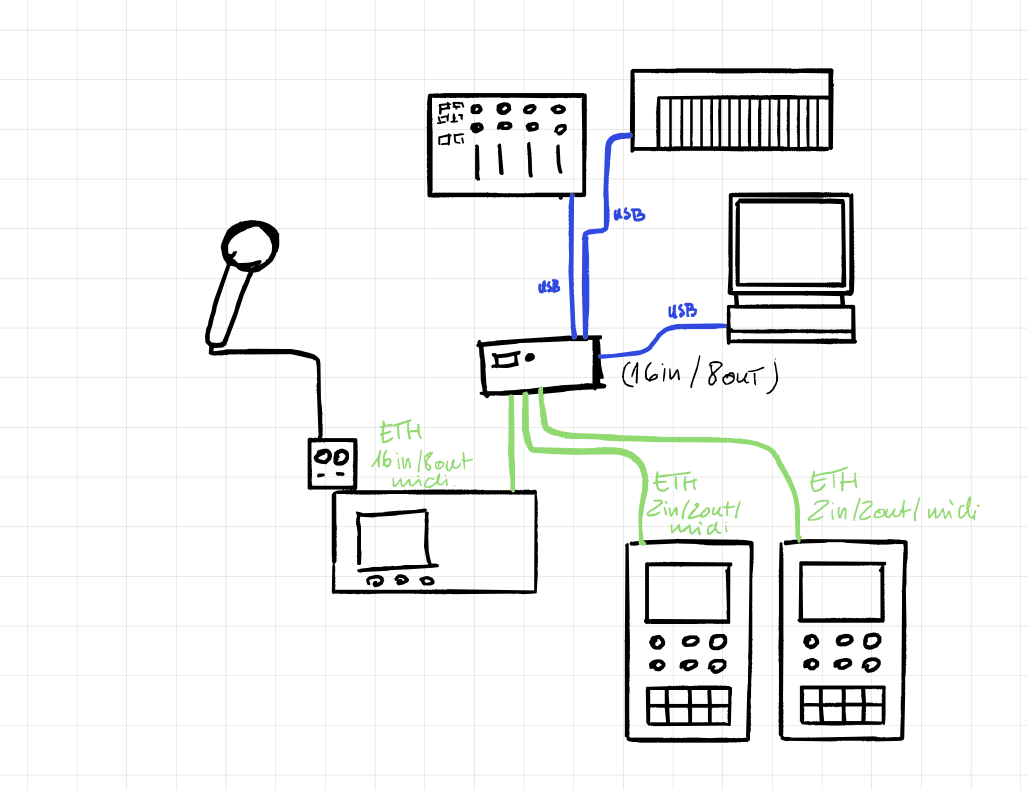
Star via HubTee — The HubTee acts as the central hub, connecting SynTees, computers, and MIDI controllers. It bridges USB/DIN MIDI onto the network and can run the patchbay UI for the whole setup.
Connectivity diagrams
HubTee as central hub — Multiple devices (SynTees, computers) connected through the HubTee via Ethernet and MIDI.
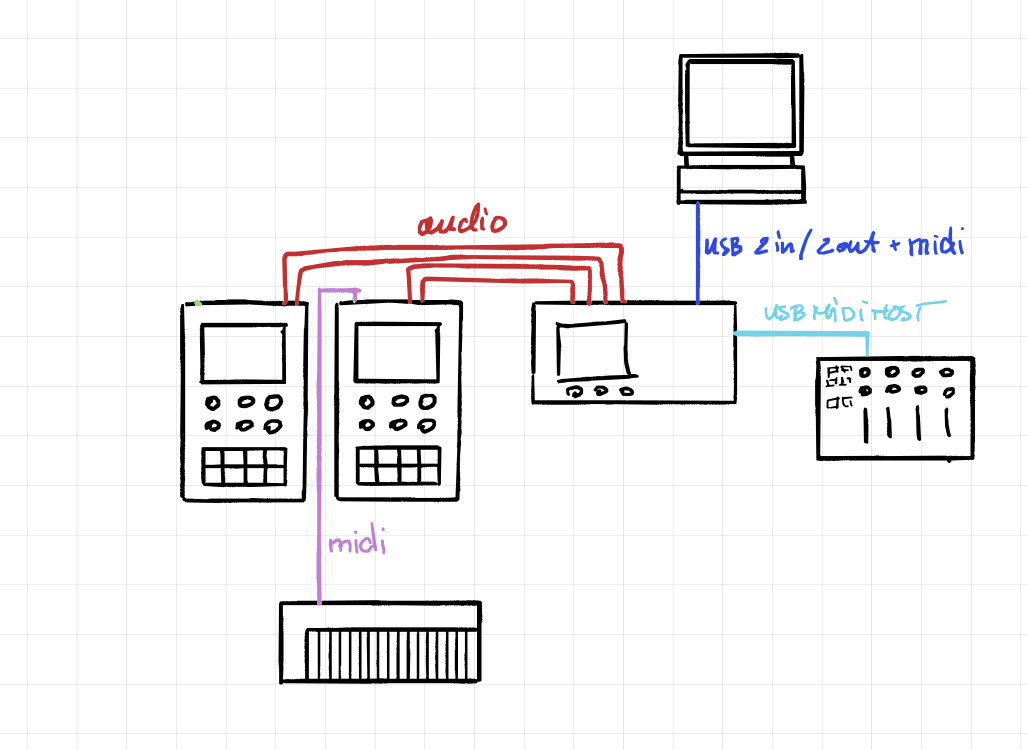
MixTee with USB — Audio routed via USB in/out to a computer, MIDI connections to controllers and synths.
MixTee with Ethernet (direct) — Audio transported over Ethernet to a computer, with separate MIDI connections to devices.
MixTee with Ethernet (switch) — Audio and MIDI both carried over Ethernet using a network switch, single-cable setup between all devices.